
Quick Summary: Choosing between a gaming headset and regular headphones is vital for your gaming experience. Headsets offer integrated microphones for clear communication, while headphones focus on pure audio. This guide helps you decide based on your budget, game type, and audio needs, ensuring you make the best choice for immersive gameplay.
Headset vs Headphones for Gaming: The Essential Choice for Every Player
Hey there, fellow gamers and audio adventurers! Edward Cavitt here, your guide to all things sound from headphonehorizon. Today, we’re diving deep into a question that pops up for many gamers: when it comes to enhancing your gameplay, should you go for a dedicated gaming headset versus headphones for gaming? It might seem like a small distinction, but the right choice can dramatically transform your gaming sessions, from crystal-clear callouts to truly immersive soundscapes. Let’s break down what makes each option unique and help you find your perfect audio companion.
Understanding the Core Differences: It’s All About the Mic
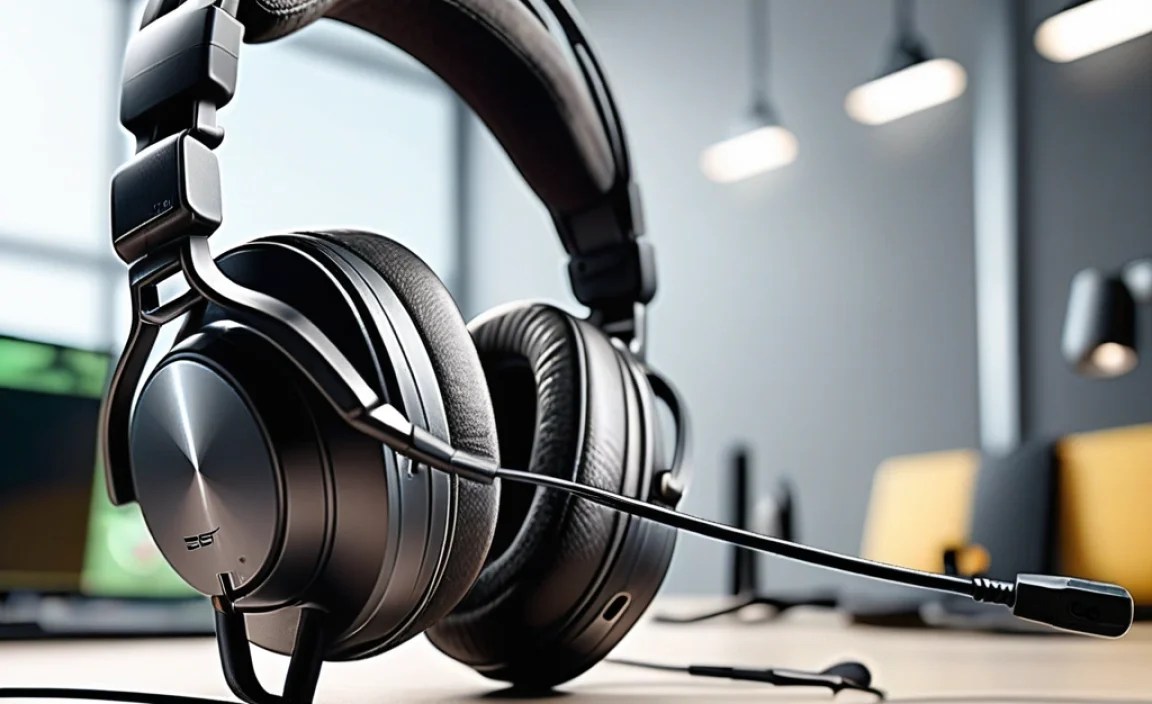
At its heart, the primary difference between a gaming headset and a pair of regular headphones is the built-in microphone. Think of it like this: headphones are designed for listening, while headsets are engineered for both listening and speaking. This distinction is crucial for anyone who enjoys multiplayer games or wants to communicate with their teammates.
What is a Gaming Headset?
A gaming headset is typically a pair of headphones with an integrated microphone. This microphone is usually attached via a boom arm that can be positioned near your mouth for optimal voice capture. Gaming headsets are specifically designed with gamers in mind, often featuring:
- Integrated Microphone: The standout feature, allowing for voice chat without needing a separate microphone.
- Durable Construction: Built to withstand the rigors of long gaming sessions and frequent use.
- Comfort Features: Padded earcups and adjustable headbands for extended wear.
- Surround Sound Capabilities: Many offer virtual surround sound (like Dolby Atmos or DTS Headphone:X) to help pinpoint enemy locations.
- Gaming-Specific Aesthetics: Often feature RGB lighting and a distinct “gamer” look.
What are Regular Headphones?
Regular headphones, on the other hand, are solely designed for audio output. They come in a vast array of styles, from in-ear earbuds to over-ear cans. While they excel at delivering rich, detailed audio for music, movies, and general use, they lack an integrated microphone for voice communication. If you use regular headphones for gaming and need to chat, you’ll typically need to purchase a separate microphone.
Why the Microphone Matters for Gamers

In the fast-paced world of gaming, seamless communication is often the key to victory. Whether you’re coordinating attacks in a tactical shooter, strategizing in an MMORPG, or just having a laugh with friends in a co-op adventure, a clear microphone is your lifeline.
- Teamwork Makes the Dream Work: In competitive multiplayer games, clear and concise communication can give your team a significant advantage.
- Social Connection: For many, gaming is a social activity. A good microphone ensures you can easily connect with friends and build communities.
- Streamer’s Essential: If you’re considering streaming your gameplay, a quality microphone is non-negotiable for engaging with your audience.
Using regular headphones for gaming without a mic means you’ll often be left out of voice chats, relying on text-based communication, which can be slow and cumbersome in critical moments. This is where a gaming headset truly shines as a unified solution.
Headset vs Headphones for Gaming: A Feature Breakdown

Let’s get into the nitty-gritty. Both gaming headsets and regular headphones offer different strengths that cater to various needs. Understanding these differences will help you make a more informed decision.
Audio Quality: The Listener’s Perspective
When it comes to pure audio fidelity – the clarity, detail, and range of sound – high-end headphones often have an edge over similarly priced gaming headsets. This is because headphone manufacturers can dedicate all their engineering resources to audio drivers and acoustic design, without the added complexity and cost of a microphone system.
- Headphones: Generally deliver a more balanced and nuanced sound profile, which is fantastic for audiophiles, music lovers, and even gamers who prioritize the subtle audio cues in their games.
- Gaming Headsets: While many gaming headsets offer excellent sound, some might prioritize bass for an explosive gaming experience over subtle details. However, premium gaming headsets are closing this gap rapidly.
Microphone Quality: The Speaker’s Perspective
This is where gaming headsets pull ahead. They are designed with microphones that are optimized for voice communication. The quality can range from basic (good enough for chat) to studio-grade (excellent for streaming).
- Headsets: Feature boom mics that are positioned close to the mouth, reducing background noise and improving voice clarity. Many offer noise-cancellation features.
- Headphones: Lack an integrated microphone. If you need one, you’ll have to look at either USB microphones or lavalier mics, which adds to the setup complexity and cost.
Comfort for Long Sessions
Both gaming headsets and quality over-ear headphones are designed for comfort, but the emphasis can differ. Gaming headsets are typically built to be worn for marathon gaming sessions, with plush earcups and adjustable headbands.
- Gaming Headsets: Often feature larger earcups that fully encompass the ear (circumaural design), which can help with long-term comfort and passive noise isolation.
- Headphones: Comfort varies greatly by model. Some are lightweight and plush, while others can be heavier due to their premium materials and larger drivers.
Connectivity Options
How you connect your audio device to your gaming setup is another consideration.
-
Gaming Headsets:
- 3.5mm Jack: A common, versatile option compatible with consoles, PCs, and mobile devices.
- USB: Offers plug-and-play convenience and can sometimes provide higher-quality audio or enable extra features through software.
- Wireless (2.4GHz dongle or Bluetooth): Provides freedom of movement, often with low latency for gaming.
-
Regular Headphones:
- 3.5mm Jack: The most prevalent.
- USB-C/Lightning: For direct connection to compatible devices.
- Bluetooth: Wireless convenience, but latency can be an issue for competitive gaming.
- Wireless (proprietary lossless): Less common, often found in high-end audio equipment.
For gaming, low latency is key. Wireless gaming headsets using 2.4GHz dongles usually offer the best wireless experience, minimizing the delay between in-game action and what you hear.
Headset vs Headphones for Gaming: Who Should Choose What?

The “better” option really depends on your personal gaming habits, budget, and priorities. Here’s a simple guide to help you decide:
Choose a Gaming Headset If:
- You play multiplayer games frequently: Clear communication with teammates is essential.
- You want an all-in-one solution: No need to buy and manage a separate microphone setup.
- You stream or create content: An integrated mic simplifies your streaming gear.
- You appreciate virtual surround sound for positional audio: Many headsets offer this feature to help you pinpoint enemies.
- You’re on a budget and want a decent all-rounder: A gaming headset can offer good value for both audio and communication.
Choose Regular Headphones (with a separate mic) If:
- Audio fidelity is your absolute top priority: You enjoy high-resolution audio for music and want the best possible sound reproduction in games. For example, audiophile-grade headphones like those from Sengpiel Audio discuss the nuances of acoustic measurements that demonstrate the focus on pure sound quality.
- You primarily play single-player games: Where voice communication isn’t a necessity.
- You already own excellent headphones: And only need to add a microphone.
- You want the flexibility to mix and match: You can pick the perfect headphones and the perfect microphone for your needs.
- You’re a streamer or content creator who wants the best possible mic quality: You can invest in a professional-grade USB or XLR microphone.
Comparing Popular Options: A Quick Look
To give you a clearer picture, let’s look at how a typical gaming headset might stack up against a comparable-quality set of regular headphones, plus a decent microphone. Note that prices and features can vary widely.
| Feature | Gaming Headset Example (e.g., HyperX Cloud Alpha S) |
Regular Headphones + Microphone Example (Headphones: Sennheiser HD 599, Microphone: Blue Yeti USB) |
|---|---|---|
| Primary Function | Gaming, Communication, Entertainment | Audio Playback (Music, Movies, Gaming) + Voice Communication |
| Integrated Microphone | Yes (Detachable Boom Mic) | No (Requires external mic) |
| Audio Quality Focus | Balanced for gaming; good for music. Often includes virtual surround. | High fidelity, natural sound reproduction; exceptional for critical listening. |
| Microphone Quality | Good to Very Good for voice chat and basic streaming. | Excellent (Blue Yeti) to Professional; superior clarity and detail. |
| Connectivity | 3.5mm, USB | 3.5mm (Headphones), USB (Mic) |
| Typical Price Range (approx.) | $100 – $200 | $180 – $250 (for both components) |
| Pros | All-in-one cost-effective solution, easy setup, mic included, often optimized for gaming sound. | Superior audio fidelity, microphone flexibility, higher potential mic quality, can be used for non-gaming audio with even greater appreciation. |
| Cons | Microphone quality might not match dedicated mics, audio may be slightly less refined than audiophile headphones. | Requires purchasing two separate items, increased desk space, potentially more complex setup, higher combined cost for equivalent quality. |
Cost-Benefit Analysis: Getting the Most Bang for Your Buck
Generally, a standalone pair of excellent headphones will cost more than a gaming headset with comparable audio drivers. However, if you factor in the cost of a good separate microphone for your headphones, the price point can become very similar. The deciding factor often comes down to convenience versus specialized performance.
For example, you can find fantastic gaming headsets from brands like Logitech G, SteelSeries, Razer, and HyperX that offer a complete package for under $150. On the other hand, a highly-regarded pair of headphones like the Sennheiser HD 599 might cost around $180, and a quality USB microphone like the Blue Yeti can add another $100. This brings the total to $280. While you get superior audio and mic quality, it’s at a significantly higher price point and with more components.
Consider your budget and what you absolutely need. If you’re starting out or on a tighter budget, a good gaming headset often provides the best balance of features and cost.
Essential Features to Look For
Whether you lean towards a headset or headphones, keep these features in mind:
For Gaming Headsets:
- Microphone Type: Noise-canceling, unidirectional, or omnidirectional. Detachable mics are a bonus for flexibility.
- Virtual Surround Sound: DTS Headphone:X or Dolby Atmos support can enhance situational awareness. The availability of these technologies is often platform-dependent; for instance, Dolby Atmos for Headphones can work on PCs and Xbox.
- Comfort: Over-ear (circumaural) designs with memory foam earcups are usually best for long wear.
- Build Quality: Metal headbands and durable plastics indicate longevity.
- Latency (for wireless): Look for 2.4GHz wireless connections for near-zero lag.
For Regular Headphones (for Gaming):
- Driver Size and Acoustic Design: Larger drivers (50mm+) generally offer better bass and sound reproduction. Open-back headphones can offer a wider soundstage but leak sound, while closed-back headphones provide isolation.
- Comfort: Similar to headsets, prioritize plush earcups and an adjustable, comfortable headband.
- Impedance: Lower impedance (below 80 ohms) is good for direct connection to PCs/consoles. Higher impedance headphones may require an amplifier for optimal performance.
- Frequency Response: While often less critical than other factors for casual gamers, a wider frequency response (e.g., 20Hz – 20kHz) indicates a broader range of audible sounds.
For Separate Microphones (if using regular headphones):
- Type: USB microphones are generally easier for beginners; XLR mics offer higher quality but require an audio interface.
- Polar Patterns: Cardioid is best for solo voice; it picks up sound from the front and rejects it from the sides and rear, minimizing background noise.
- Features: Built-in controls for gain, mute, and headphone monitoring are very useful.
Troubleshooting Common Issues
Whether you choose a headset or headphones, you might encounter minor hiccups. Here are a few common ones:
- No Sound:
- Check Connections: Ensure the 3.5mm jack or USB is firmly plugged in.
- Select Correct Output Device: In your operating system’s sound settings, make sure your headset/headphones are set as the default playback device.
- Volume Levels: Verify that the onboard volume controls on the headset/cable and the software volume are turned up.
- Microphone Not Working:
- Enable Microphone: Check if the microphone is physically muted (a common button on headsets) or disabled in your system’s sound privacy settings.
- Select Correct Input Device: In your sound settings, ensure the correct microphone is set as the default recording device.
- Driver Issues: On PC, sometimes reinstalling audio drivers or unplugging and replugging the USB device can help.
- Poor Audio Quality:
- Virtual Surround Settings: If using virtual surround, try toggling it off to see if the sound improves. Sometimes, it can make audio sound artificial.
- Source Quality: Ensure the game or media you’re listening to has good audio quality.
- Buzzing or Static:
- Interference: Wireless devices can sometimes pick up interference. Try moving closer to the dongle or changing USB ports.
- Cable Issues: For wired devices, check the cable for damage.
For more advanced troubleshooting, consult the manufacturer’s support documentation. Resources like Rtings.com provide detailed technical reviews and often include user feedback and potential issues.
Frequently Asked Questions (FAQ)
Q1: Can I use regular headphones for gaming if I don’t need to talk to anyone?
A1: Absolutely! If you primarily play single-player games or don’t use voice chat, regular headphones can offer superior audio quality for a more immersive experience. Just make sure they are comfortable for long sessions.
Q2: Is a gaming headset worth it if I only play casually?
A2: It depends. If you occasionally jump into games with friends, a budget-friendly gaming headset can be a great all-in-one solution. If you never use voice chat, you might get better audio for your money with regular headphones.
Q3: How important is “virtual surround sound” on a gaming headset?
A3: For competitive games where pinpointing enemy locations is crucial, virtual surround sound can be very beneficial as it enhances directional audio cues. For more casual or story-driven games, its impact might be less significant.
Q4: My gaming headset
